
Drake Burning Bridges AI video
Burning Bridges AI Video: Put One Photo in Drake’s “Where She At?” Party
Make a Burning Bridges AI video from one photo: you, a friend or your dog takes over the chandelier-lit party from Drake’s “Burning Bridges” video, with the silver cup in the left hand, the collar grab and both “Where she at?” hand-over-eyes moments, and the song laid back under it. Seedance 2.5 makes the whole 20-second routine in vertical 9:16 or 16:9. No prompt; the credit price shows before you generate.
Make my Burning Bridges AI video- One photo · person or pet
- 10, 15 or 20 s · 9:16 or 16:9
- Drake song included
- Credits shown before you generate
20 s · 480p · one photo · song added after generation
Seedance 2.5 holds the face best and is the only model for the full 20 s; Seedance 2.0 Mini is the cheapest way to test a photo. Credits are charged when the job starts and refunded automatically if it fails or the photo is rejected.
Preview: a finished community example, credited on this page and not made here. Your video follows the same routine from a depth map of the party scene; the depth map itself never appears in the result.
Burning Bridges AI Video Examples
Five Burning Bridges AI videos from other generator pages: the same party trend, each made from one photo. Two are vertical with the song; three are 16:9 and silent as published.
A chimp in gold chains takes the cup
9:16 · with the song · Source: Starrd
Black bomber jacket, white tee
9:16 · with the song · Source: Flowlio
Red T-shirt, red cup
16:9 · silent as published · Source: burningbridgesai.org
Yellow T-shirt
16:9 · silent as published · Source: burningbridgesai.org
Blue-grey T-shirt
16:9 · silent as published · Source: burningbridgesai.org
None of these were made on this site. They are shown unchanged and credited so you can see the trend in each frame; their routines differ a little from ours. Your video follows the routine described further down.
Burning Bridges AI Video at a Glance
Everything the generator does, in one table. Prices come from the same quote the button charges.
| Item | Burning Bridges AI video |
|---|---|
| Input | One photo of one person or one pet. JPG, PNG or WebP, up to 20 MB |
| Pets | Supported: the pet stands upright, holds the cup in a paw and keeps its own face and fur. Results vary more than with people |
| How it is made | Your photo first becomes a party still (an image model places your subject under the chandeliers with the cup), then Seedance follows a depth map of 2:40–3:00 of the official video: movement, cuts and handheld camera only, no faces or outfits |
| Key moves | Cup pushed at the lens, pointing around the room, the collar grab, leaning into the crowd, and “Where she at?” twice (about 15 s and 17 s of the 20 s cut) |
| Look | Face, hair, clothes and jewellery come from your photo; the silver cup is added. The room and crowd are generated; nobody from the video appears |
| Prompt | None. The routine and its timing are built in |
| Length | 20 s, the whole routine (Seedance 2.5 only); 10 or 15 s, the ending with both “Where she at?” moments, on every model |
| Frame | Vertical 9:16 (default) or horizontal 16:9, same price |
| Models | Seedance 2.5 (default), Seedance 2.0, 2.0 Fast and 2.0 Mini |
| Output | MP4 at 480p (default), 720p or 1080p: 480 × 854 to 1080 × 1920 vertical, 854 × 480 to 1920 × 1080 horizontal. 1080p on Seedance 2.0 and 2.5 |
| Song | Yes: the song from that part of the official video is laid under your MP4. The model itself renders silently |
| Lowest price | 11 credits (Seedance 2.0 Mini, 10 s, 480p) |
| Full 20 s | Seedance 2.5: 158 credits at 480p, 351 at 720p, 621 at 1080p, the party still included |
| Trial pack | $5 one-time = 24 credits, enough for one 10 or 15-second Seedance 2.0 Mini video at 480p |
| Watermark | Videos made before your first purchase carry a moving raindancemaker.com watermark; any purchase removes it from new videos and unlocks clean copies of earlier ones |
| If it fails | Credits are charged when the job starts and refunded automatically if the still or the video fails, or the provider’s review rejects a photo |
| Who sees it | Only you, in your account; nothing is published or used as an example |
| Device | Any phone or desktop browser; no app to install |
Last verified: October 12, 2026.
How to Make a Burning Bridges AI Video From One Photo
1. Upload one photo
Use a clear, well-lit photo of one person or one pet, with the face sharp and toward the camera and the upper body in frame. What they wear in the photo comes along.
2. Pick the frame, length and quality
Choose 9:16 for TikTok and Reels or 16:9 like the original. Keep Seedance 2.5 and 20 s for the whole routine, or pick a Seedance 2.0 model for the 10 or 15-second ending. The button shows the credit cost first.
3. Generate, check and download
A still of your subject at the party is made first, then the video, then the song is laid under it, usually within a few minutes. Play it with sound, check the face after each hand over the eyes, and save the MP4.
Doing this yourself means cutting the clip, making a depth map, writing a second-by-second move list and laying the song back on. This page has all of that ready; you only choose who stars.
What Happens in the 20-Second Burning Bridges AI Video
These are frames of what the model follows: a depth map made from 2:40–3:00 of the official video. It carries only movement and camera, never anyone’s face or clothes, which is why your subject keeps their own look.
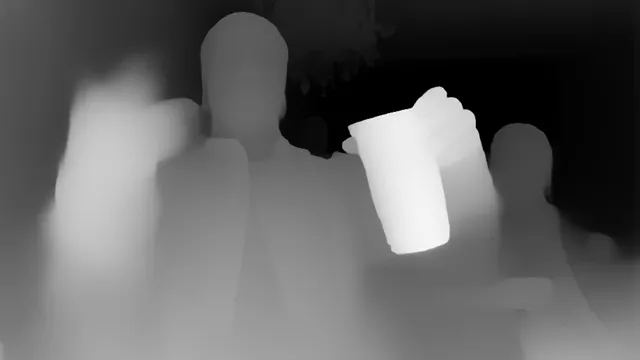
0:02The cup at the lens
The silver cup pushed toward the camera in the left hand, a flick of the right.
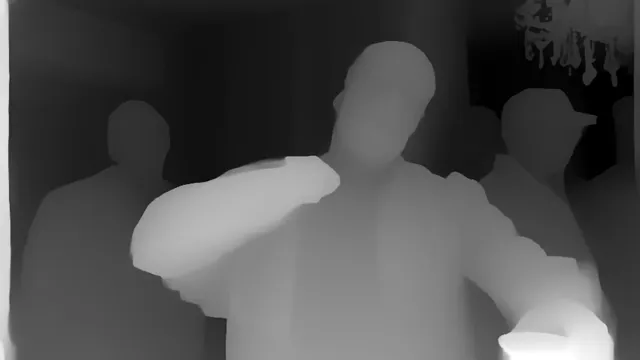
0:07The collar grab
Right hand on the collar, chin up, the cup still in the left hand.
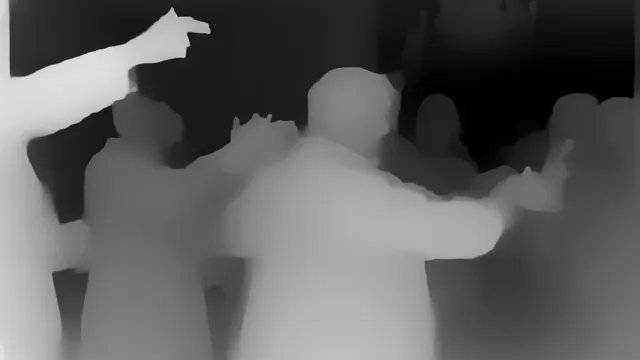
0:10Working the room
Leaning into the crowd, arm out, pointing at friends while the room cheers.
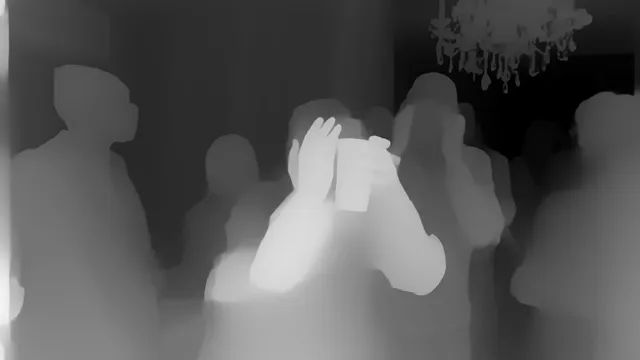
0:15“Where she at?”
A flat palm over the eyes, scanning the room on the lyric, then once more at 0:17.
Comes from the template
The wood-panelled room under the chandeliers, the cheering crowd, the handheld camera and its cuts, the routine and its timing, the silver cup in the left hand and the song.
Comes from your photo
The face, hair, skin tone, glasses, clothes and jewellery, or a pet’s own face, fur and markings. Nothing of Drake’s look is copied.
Motion source: Drake, “Burning Bridges” (official video), 2:40–3:00, used as a depth map plus its audio. The original is on YouTube
Burning Bridges AI Video Length: 10, 15 or 20 Seconds
The shorter lengths are the end of the routine, not its start, so every length keeps both “Where she at?” moments.
| Length | What it shows | Models |
|---|---|---|
| 10s | From leaning into the crowd: the finger flick, both “Where she at?” and the wave-off | Every model |
| 15s | From the arms-out pointing: the collar grab, the crowd, both “Where she at?” and the wave-off | Every model |
| 20s | The whole routine: the close-up, the cup at the lens, the pointing, the collar grab, the crowd, both “Where she at?” and the wave-off | Seedance 2.5 only |
Which model to pick
- Seedance 2.5: the only model for the full 20 s, 480p to 1080p. Your photo, the still and the depth map pass the provider’s review first.
- Seedance 2.0 Mini: the cheapest, 10 or 15 s at 480p or 720p. A good first test of a photo.
- Seedance 2.0 Fast: mid price, 10 or 15 s at 480p or 720p.
- Seedance 2.0: 10 or 15 s, up to 1080p.
MiniMax H3 isn’t offered on this template: it hasn’t been set up for the depth-map reference.
Burning Bridges AI Video Price: Credits by Model and Length
Every price is per finished video and already includes the party still. The generator shows the same number before anything is charged.
| Model · resolution | 10s | 15s | 20s |
|---|---|---|---|
| Seedance 2.5 · 480p | 80 | 119 | 158 |
| Seedance 2.5 · 720p | 177 | 264 | 351 |
| Seedance 2.5 · 1080p | 312 | 467 | 621 |
| Seedance 2.0 Mini · 480p | 11 | 16 | — |
| Seedance 2.0 Mini · 720p | 21 | 31 | — |
| Seedance 2.0 Fast · 480p | 35 | 51 | — |
| Seedance 2.0 Fast · 720p | 72 | 106 | — |
| Seedance 2.0 · 480p | 57 | 83 | — |
| Seedance 2.0 · 720p | 118 | 176 | — |
| Seedance 2.0 · 1080p | 293 | 438 | — |
At the cheapest monthly-plan rate ($0.037 per credit), the full 20 s on Seedance 2.5 comes to about $5.87 at 480p, $13.05 at 720p and $23.09 at 1080p.
The $5 trial pack (24 credits) covers a 10 or 15-second Seedance 2.0 Mini video at 480p, but not the full 20 s. The Starter plan (240 credits for $9 a month) covers one full 20-second video at 480p.
What costs credits, and what doesn’t
- The frame, 9:16 or 16:9, doesn’t change the price.
- The party still made from your photo is part of every quote; there is no separate charge.
- New accounts may receive 5 signup credits to try it.
- Videos made on a free account carry a moving raindancemaker.com watermark.
- Any paid order removes the watermark from new videos and unlocks the clean originals of the ones you have already made.
- Credits are charged when a job starts. If it fails, they are refunded automatically.
Compare plans on the pricing page
Tip: test a new photo with a 10-second Seedance 2.0 Mini video, then make the full 20 seconds on Seedance 2.5.
Credits for Burning Bridges AI videos
Every plan and pack works on this page and on the other templates. Any paid order removes the watermark from new videos.
Starter
For trying the trend
240 credits / month
≈ 1 full 20-second Burning Bridges AI videos (Seedance 2.5, 480p)
- Watermark-free videos, including ones you already made
- Failed videos refunded
- Email support
Pro
For regular creators
780 credits / month
≈ 4 full 20-second Burning Bridges AI videos (Seedance 2.5, 480p)
- Watermark-free videos, including ones you already made
- Failed videos refunded
- All lengths up to 15 seconds
- Priority support
Enterprise
For agencies and pages
2,650 credits / month
≈ 16 full 20-second Burning Bridges AI videos (Seedance 2.5, 480p)
- Everything in Pro
- Dedicated support
- Custom integrations
Is the Burning Bridges AI Video Generator Free?
Short answer: no. Signing up, uploading a photo and watching the examples are free, but each video costs credits, shown next to the button before you generate. No subscription is needed: a one-time trial pack covers a short test.
Videos made before your first purchase carry a moving raindancemaker.com watermark. After any purchase, new videos have none and clean copies of the earlier ones unlock.
New accounts may get 5 free credits to try it.
If a video fails or the provider rejects a photo, the credits come back automatically.
Does the Burning Bridges AI Video Include the Drake Song?
Yes. The audio from the same 20 seconds of the official video is laid under your MP4 in time with the routine, including both “Where she at?” lines. The video model renders silently and the song is added afterwards, so the mouth follows the rhythm closely but not word for word.
The music belongs to its rights holders. TikTok or Instagram may recognise the track when you post; you can always swap in the platform’s official sound.
Burning Bridges AI With Your Dog or Cat
Upload one clear photo of your pet with its face visible. The template has it stand upright in the middle of the party, hold the silver cup in its left paw, point and wave with the other and cover its eyes on “Where she at?”, keeping its own face, fur and markings and never human lips or hands.
Pets are less predictable than people: the model may drop the cup, turn the pose or soften the markings. Try a 10-second Seedance 2.0 Mini video first; failed videos are refunded automatically.
Photo Tips: Keep Your Face Through Both “Where She At?” Moments
Likeness isn’t guaranteed: the face can shift for a moment after the hand leaves the eyes or after a fast camera move. These habits keep it closest to your photo.
- One subject. Crop a group shot to the person or pet you mean; two faces can blend.
- Face sharp and forward. Front or three-quarter view with the eyes visible; no sunglasses, no hands near the face.
- Upper body in frame. A waist-up photo carries your clothes and jewellery into the party.
- Bright, even light. The room is dark and warm; a well-lit photo keeps detail after the colour grade.
- Expect a flicker at the cover. With the eyes covered, the model rebuilds the face when the hand moves away; a sharper photo shortens that moment.
- Test short first. Try 10 seconds on Seedance 2.0 Mini, then make the full 20 seconds on Seedance 2.5.
Burning Bridges AI Video Generators Compared
Published facts from each tool’s own page. Prices and limits change, so check the page before you buy.
| Tool | Input | Length | Frame | Resolution | Song | Watermark | Price |
|---|---|---|---|---|---|---|---|
| This page | 1 photo, person or pet | 10, 15 or 20 s | 9:16 or 16:9 | 480p, 720p, 1080p | Included | Until your first purchase | From 11 credits; 20 s on Seedance 2.5: 158 / 351 / 621 |
| Starrd | 1 photo, person or pet | 20 s | 9:16 | 480p | Included | Not stated | 150 credits, about $7.50 |
| Flowlio | 1 photo, person, dog or cat | About 20 s | 9:16 | 480p, 720p, 1080p | Included | None (stated) | 480p 500 credits (trend sale), 720p 1,500, 1080p 2,500 |
| burningbridgesaivideo.com | 1 photo, one person | 15 s | 4:5 native; 9:16, 16:9, 1:1 | 480p, 720p, 1080p | Template audio kept | Not stated | 480p 50 / 720p 100 / 1080p 200 credits; $9.90 = 100 credits |
| apt video ai | 1 photo, one person; hat, coat and cup added | About 25 s | 16:9 | 480p, 720p, 1080p | Included | None (stated) | 480p 20 / 720p 45 / 1080p 80 credits; $9.90 = 20 credits |
| Higgsfield Genjutsu | Your own 4–30 s clip plus images; no Burning Bridges preset | Follows your clip | Follows your clip | Up to 1080p | Your clip’s audio | Not checked | 15 s: $2.00 (480p), $5.20 (720p), $7.20 (1080p) |
Read between October 7 and 12, 2026. We don’t rank the tools: the right one depends on the frame, length and price you want.
What Is the Burning Bridges AI Trend?
“Burning Bridges” is a Drake song from the album Iceman, released on May 15, 2026 by OVO Sound and Republic Records and widely read as aimed at A$AP Rocky; it peaked at No. 13 on the Billboard Hot 100. Its video, shot by Theo Skudra, is one handheld take of a packed party at Sotto Sotto in Toronto’s Yorkville, with Drake working the room holding a silver cup.
The move everyone copies is “Where she at?”: a flat hand over the eyes, scanning the room. It went global at the 2026 World Cup, when Drake did it on the big screen in Toronto on July 3 after Cristiano Ronaldo’s penalty against Croatia.
The AI version took off in September 2026 with Higgsfield’s Genjutsu motion-transfer tool: people put themselves, friends, cartoon characters and pets into the party. One-photo template pages like this one followed, so nobody has to find, trim and depth-map the clip themselves.
Not the “Burnin’ Bridges” AI music
Searching “burning bridges ai” also brings up BURNIN’ BRIDGES Ai Music, an AI-generated country act, along with questions like “is burning bridges ai generated” and “burning bridges ai song”. That act is unrelated: this page is about the Drake video trend.
This site is an independent tool, not affiliated with or endorsed by Drake, OVO Sound, Republic Records, Universal Music Group, Theo Skudra, Higgsfield or the generator sites whose examples are shown. The template uses a depth map of the official video plus its audio for parody and personal posts; use photos of yourself, your pets or people who agreed to appear.
Burning Bridges AI Video FAQ
What AI tool are people using for the Drake Burning Bridges video trend?
The trend started with Higgsfield Genjutsu, a motion-transfer tool where you bring the clip yourself. One-photo template pages followed. On this page you upload one photo and Seedance 2.5 recreates the whole 20-second party routine with the song; no clip and no prompt needed.
Can I turn one photo into the Burning Bridges AI trend video?
Yes. One clear photo of one person or one pet is the whole input. It becomes a party still first, then the video follows the routine of the official video’s party scene.
How do I make a Burning Bridges AI video with my own face?
Upload a sharp, front-facing photo, pick 9:16 or 16:9, keep Seedance 2.5 and 20 seconds (or a cheaper 10 or 15-second ending) and press Generate. The MP4 with the song is usually ready within a few minutes.
Does it do the silver cup and both “Where she at?” moves?
That is what the template is built for: the cup in the left hand pushed at the lens, the pointing, the collar grab and a flat hand over the eyes at about 15 and 17 seconds of the 20-second cut. AI can still soften or drop a move; a failed video is refunded.
Is there a free Burning Bridges AI video generator with no watermark?
Not here. Signing up and previewing are free, but every video costs credits, shown before you generate. New accounts may get 5 free credits to try it. Videos made before your first purchase carry a moving watermark; any purchase removes it, including from earlier videos.
How much does a Burning Bridges AI video cost?
From 11 credits (Seedance 2.0 Mini, 10 s, 480p; 16 for 15 s). The full 20 seconds on Seedance 2.5 costs 158 credits at 480p, 351 at 720p and 621 at 1080p, the party still included. Credits are charged when the job starts and refunded automatically if it fails.
Does the Burning Bridges AI video include the Drake song or do I have to add it myself?
It’s included: the audio from the same part of the official video is laid under your MP4 in time with the routine. TikTok or Instagram may recognise the track when you post.
Can I make the Burning Bridges AI video with my dog or cat?
Yes. Upload one clear photo of your pet: it stands upright, holds the cup in a paw and keeps its own face and fur. Results vary more than with people, so try a 10-second video first.
How long is the video, and can it be vertical for TikTok?
20 seconds on Seedance 2.5, or the last 10 or 15 seconds on every model. Choose vertical 9:16 (480 × 854 up to 1080 × 1920) or horizontal 16:9 (854 × 480 up to 1920 × 1080); the frame doesn’t change the price.
Which AI model does the Burning Bridges template use?
Seedance 2.5 by default, the only one that makes the full 20 seconds. Seedance 2.0, 2.0 Fast and 2.0 Mini make the 10 or 15-second ending for fewer credits. The party still comes from an image model (Nano Banana 2 Lite, with GPT Image 2 as fallback).
What kind of photo works best?
One person or pet, face sharp and toward the camera, eyes visible, upper body in frame and bright, even light. Crop group photos and skip sunglasses.
Why does my face change when the hand covers my eyes?
With most of the face covered, the model has to rebuild it when the hand moves away, so it can shift for a moment. A sharp, front-facing, well-lit photo helps most.
Do I need to write a prompt?
No. The scene, the move list and the timing are built in; you choose the photo, frame, length and quality.
What happens if a generation fails or my photo is rejected?
Your credits come back automatically. Try a clearer photo of one person; celebrity photos and screenshots from films or music videos are usually rejected by the provider’s review.
Are my photo and video private?
Yes. Only your account can see them; they are never published or used as examples.
Is this the same as the Burnin’ Bridges AI music?
No. BURNIN’ BRIDGES Ai Music is an unrelated AI-generated country act. This page makes videos of the Drake “Burning Bridges” party trend.
Is this the same as Higgsfield Genjutsu?
No. Genjutsu is a general motion-transfer tool: you bring and trim your own clip and describe the swap. This page is a ready Burning Bridges template: one photo, a fixed routine and the song included.
Is this affiliated with Drake?
No. It is an independent tool, not affiliated with or endorsed by Drake, OVO Sound, Republic Records or Universal Music Group.
Who’s taking over the chandelier room?
One photo, the silver cup, both “Where she at?” moments and the song. 20 seconds on Seedance 2.5, refunded automatically if a generation fails.
More templates: Raindance AI · Hotel Lobby AI · Alors on Danse AI · Rumpelstiltskin AI · APT AI Video · Bulin 47 AI Video